
Key Features
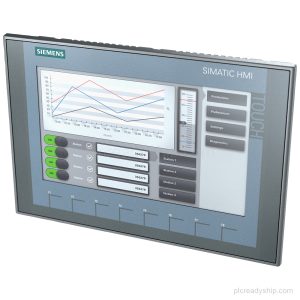
- Key/touch operation: Basic Panel with key/touch operation for operator control and monitoring tasks.
- 12" TFT display: TFT widescreen display with LED backlighting, 12 in screen diagonal, 1 280 pixel x 800 pixel resolution, and 65 536 colors.
- PROFINET interface: Includes 1 industrial Ethernet interface with PROFINET support.
- Configuration software: Configurable from WinCC Basic V13 / STEP 7 Basic V13.
- Mounting options: Vertical mounting position, with portrait and landscape format mounting possible.
Technical Summary
| Product type designation | KTP1200 Basic color PN |
|---|---|
| Display type | TFT widescreen display, LED backlighting |
| Screen diagonal | 12 in |
| Horizontal image resolution | 1 280 pixel |
| Vertical image resolution | 800 pixel |
| Number of colors | 65 536 |
| Type of supply voltage | DC |
| Rated value (DC) | 24 V |
| Permissible range, lower limit (DC) | 19.2 V |
| Permissible range, upper limit (DC) | 28.8 V |
| Current consumption (rated value) | 510 mA |
| Active power input, typ. | 12.2 W |
Applications
- Operator control and monitoring: For key/touch-based HMI operation and monitoring.
- PROFINET network connection: For communication over a PROFINET-based industrial Ethernet connection.
- Modbus TCP/IP communication: For communication using Modbus TCP/IP.
Frequently Asked Questions
What is the exact model of this Siemens HMI panel?
The exact model is 6AV2123-2MB03-0AX0, with product type designation KTP1200 Basic color PN.
What display specification does 6AV2123-2MB03-0AX0 have?
It has a 12 in TFT widescreen display with LED backlighting, 1 280 pixel x 800 pixel resolution, and 65 536 colors.
What communication interfaces and protocols are supported?
It has 1 industrial Ethernet interface and supports PROFINET, EtherNet/IP, TCP/IP, DHCP, DCP, LLDP, and MODBUS with Modicon (MODBUS TCP/IP).
What is the supply voltage for this KTP1200 Basic panel?
The supply voltage type is DC, with a rated value of 24 V and a permissible range of 19.2 V to 28.8 V.
Which configuration software can be used for this panel?
It is configurable from WinCC Basic V13 / STEP 7 Basic V13.